Process intelligence
We digitize your processes with Customized solutions
Through individual app development and targeted process automation, we create efficiency where there was previously complexity. This creates a new dimension of transparency and automation that will transform your business in the long term.
Use cases
A selection of our work
Inventory management
Initial situation
- No precise overview of current stock levels
- Volatile higher demand for certain products
- Large amount of manual work involved in comparing current stocks with consumption
Description
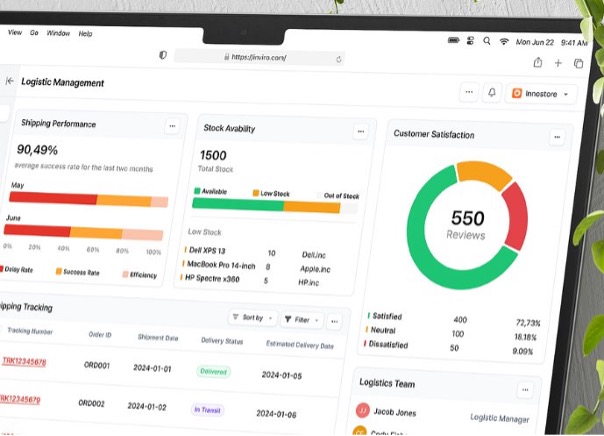
- Current stock levels are recorded using barcode scanners and IoT sensors. The interface to the core system enables real-time monitoring of stock levels in the individually created Power App
- An automated process using Power Automate is being developed that regularly compares stock levels with consumption data. This reduces manual effort and increases the accuracy of inventory data
- AI models are used to analyze historical consumption data in order to forecast future demand. Based on these forecasts, automatic reorders are triggered to avoid bottlenecks
- The Power Platform generates regular reports that provide an overview of stock levels, consumption and reorders. These reports can be easily customized and shared
Added value / goal
- Automated reconciliation of stock levels
- Automated reordering taking into account historical consumption
- Reduction of manual errors and increase in accuracy
- Automation of routine tasks such as creating reports
Onboarding new employees
Initial situation
- New employees are unsure of their roles and responsibilities, leading to confusion and inefficiency
- They didn't feel properly informed, didn't know what the status of onboarding was and what they still had to do
- The dissatisfaction of new people increased, which was due to an uncoordinated and complicated process
- The waiting times for new work equipment or additional orders were very long
Description of the
- With the help of Power Automate, new employees are automatically informed about their specific tasks and responsibilities
- A dashboard is created in Power BI that shows the current status of onboarding for each new employee in real time. This enables new employees to see at any time which steps have already been completed and which are still outstanding
- Routine tasks such as sending welcome emails, reminders and updates are automated. Power Automate ensures that new employees are informed on a regular basis
- The Power Platform integrates seamlessly with MS Teams and Outlook to automatically schedule meetings with relevant team members and managers
- An automated process is set up to ensure that all necessary work equipment and access is provided on time. Orders and approvals are managed efficiently via the Power Platform
Added value / goal
- Automation of routine tasks such as emails, meeting planning and account creation
- Provision of real-time analyses and progress monitoring reports
- Seamless integration of other systems such as MS Teams, Dynamics and others
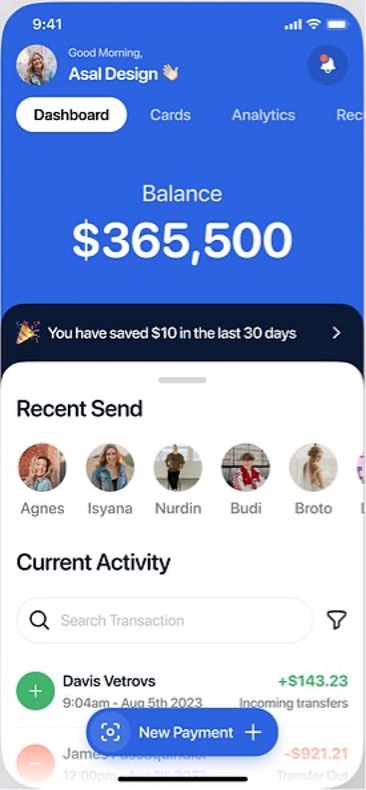
Expense management application
Initial situation
- Employees find it difficult to claim their expenses correctly and promptly, which leads to confusion and errors
- The processing and approval of expense reports requires a lot of manual effort
- There is no clear overview of approved and outstanding expenses
- Employees are unsure about the applicable expense policies and procedures, which leads to misunderstandings and incorrect claims
Description of the
- The receipts can be photographed directly from the cell phone and an AI model recognizes the data on the receipt
- Power Automate automatically distributes expense reports to supervisors for approval
- A dashboard in Power BI provides a clear overview of approved and outstanding expenses
- A customized app from the Power App provides guided input for information that cannot be found on the receipts. This ensures that all necessary data is entered completely and correctly
- The Power Platform with AI support ensures that all expense reports comply with company guidelines and legal regulations. This reduces the risk of compliance violations and increases security.
Added value / goal
- Entry of expense reports by employees with subsequent approval by the line manager
- Automating data entry and ensuring that all necessary information is recorded
- Improving efficiency and compliance with regulations
- Automatic recognition of data from the expense voucher
- Guided input of information that cannot be found on the document
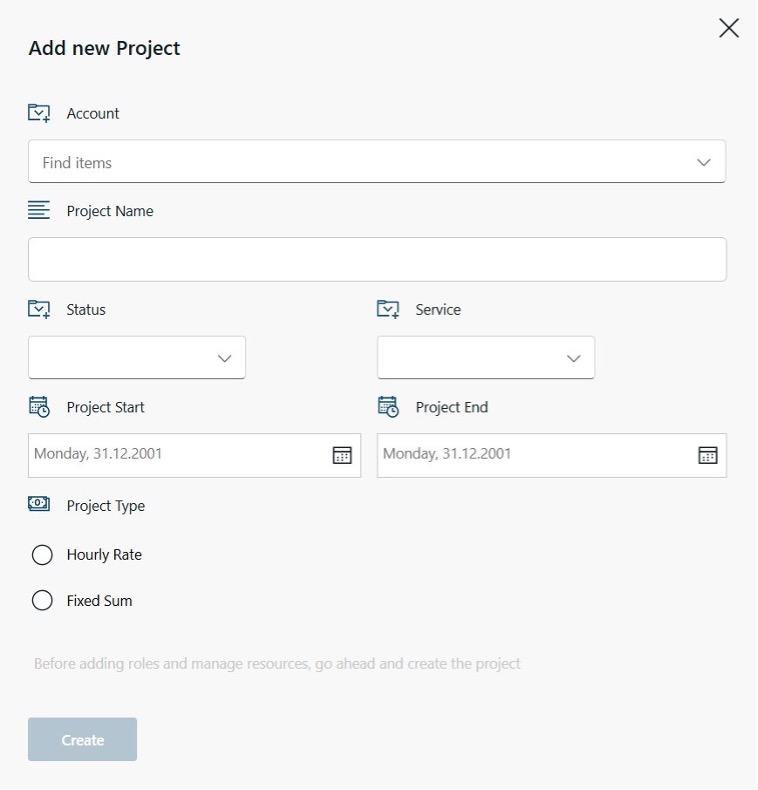
Automatic project opening
Initial situation
- Project creation requires many manual steps, which is time-consuming and error-prone
- Projects often start late because the necessary resources and information are not provided on time
- There are no standardized processes and templates for opening projects
- Manual entries and a lack of automation lead to a high error rate
- Certain master data had to be entered several times in different systems
Description of the
- The project is recorded using an application from the Power App so that all the necessary information is entered
- The information for further openings in core and peripheral systems is passed on automatically via Power Automate and the interfaces
- Certain guidelines from the company or standards for the project opening are maintained in the Power Platform and thus taken into account accordingly at the opening
Added value / goal
- One-time entry of project master data, high quality and very large time savings
- Opening takes just a few minutes in all the necessary systems in parallel
- The project managers are satisfied because a great deal of administrative work has been eliminated
- Adjustments to systems or guidelines are controlled centrally and no longer need to be trained

Establishing governance for the Power Platform
Initial situation
- M365 with the Power Platform was introduced in a company
- Digital-savvy employees quickly created their own teams, processes and built applications without considering guidelines, which led to inconsistencies in the medium term
- Processes and applications that were used by several employees were no longer managed after the employee left the company
- No control of costs due to premium licenses
- No control of data flow to external systems due to self-built processes
Description of the
- Governance guidelines have been developed and implemented to establish clear policies and best practices for the use of the Power Platform and M365
- The vision&-Governance App or Center of Excellence (COE) was set up to manage and monitor all teams, processes and applications created
- A lifecycle management process has been established to ensure that all applications and processes are regularly reviewed, updated and archived as required
- Guidelines and tools for monitoring and controlling the flow of data between internal and external systems have been introduced
- Regular training and information campaigns were carried out to inform employees about the new guidelines and best practices
Added value / goal
- Uniform guidelines when creating teams, processes and applications
- Centralized management and monitoring through a governance system (not just on paper, but system-based)
- Prevention of data loss or other security breaches through role and authorization management and data flow control
- No system corpses thanks to centrally controlled lifecycle management
- Adherence to compliance requirements and protection of sensitive data through clear guidelines and monitoring tools

Framework for Citizen Developers
Initial situation
- Several employees in the business work on the same applications or processes without knowing about each other
- There is no exchange between the citizen developers (non-professional developers in the business units)
- Employees independently create teams, processes and applications without uniform guidelines
- Processes and applications that are used by several employees are no longer managed after they leave the company
- No company-wide orchestration or communication, employees recognize the immense added value for their work in teams or departments, the technology does not
Description of the
- Using a clearly structured framework, the various phases following the introduction of M365 could be set up
- By establishing and guiding internal communities, knowledge could be distributed on a scaled basis
- Development of targeted training within the company in order to incorporate the know-how in a targeted manner with the internal guidelines
Added value / goal
- Knowledge about development within business units can be controlled and channeled, minimizing wastage
- A clear rollout plan means that subsequent clean-up work can be minimized
- Cost and security control through established governance
- Enormous increase in efficiency and employee satisfaction thanks to decentralized development, directly in the business
- Maximum scaled benefit of the new technology, through automation of processes, controlled data input using apps or well-founded information using dashboards

Training courses on Udemy
Initial situation
- The global demand for training and further education as part of the Power Platform is very high
- The potential and added value of the technology is being increasingly recognized
- Due to the shift from per-code to low-code developments, demand is increasing more and more
- Search for additional sources to maintain the network of low-code developers
Description of the
- Development of training materials for new and experienced developers in the low-code scene
- Definition of clear learning objectives so that participants gain maximum added value
- Create course content in such a way that participants do not lose interest and book further training courses
Added value / goal
- Participants should generate added value from the training courses
- Remain one of the top offerings within the Power Platform in the long term
- Gain the experience of training courses in order to optimally conduct physical or virtual training courses outside the Udemy environment
- Being forced to always be up to date because the training courses have to be constantly adapted

Automated social media posts
Initial situation
- Constantly creating new social media posts is time-consuming and the content must be systematically researched
- Finding new content can be very time-consuming
- This work is not always equally popular and automation is welcome
- The known sources of content can dry up
Description of the
- A Power Automate workflow identifies suitable content via RSS feeds
- The guidelines for social media posts are defined
- Definition of the approval process
- Power Automate automates the content from source to publication, including an LLM
- Control of the appropriate interval
Added value / goal
Automated content search via RSS feeds
AI-generated social media posts with a consistent tone of voice
Efficient approval process thanks to integrated approval
Regular and predictable publication of content
Relief for the marketing team and greater reach through continuous activity
- Topic-specific content
- Minimal effort from research to finished content, including publication
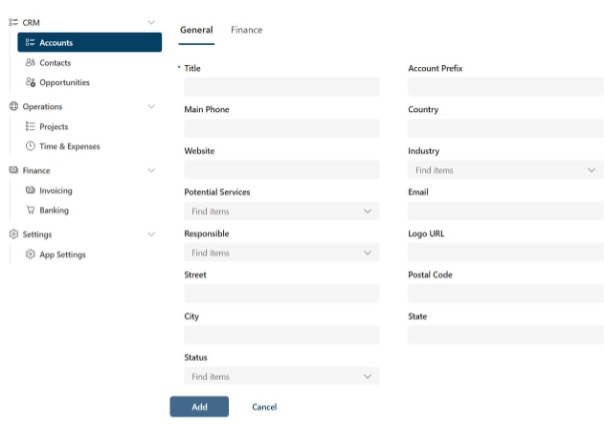
CRM
Initial situation
- No professional system to store customers or potential customers in a structured way
- Lack of willingness to incur recurring costs for a CRM system
- Historical growth of a decentralized personal master database
- Dedicated storage of very sensitive data / customers that should not be stored in the core CRM
Description of the
- Preparation of a concept to take into account the individual benefits of the CRM system
- Requirement engineering by means of a design workshop to ensure that everyone is talking about the same thing
- Development based on the concept and requirement engineering
- Ongoing tests of an end user at weekly intervals
Added value / goal
- First results after a few days of development
- Customized result with seamlessly integrated interfaces, if required
- Always very close to the development in order to be able to have a controlling effect and thus cover the need as much as possible.
- Building the application and, if necessary, processes on a very modern platform with plenty of expansion options using future technologies
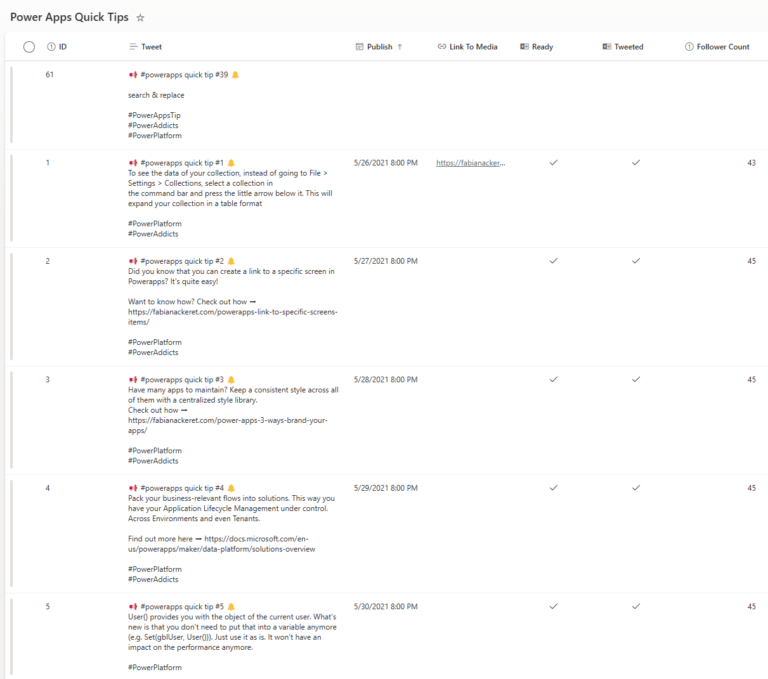
Content scheduler for social media
Initial situation
Social media content was planned unstructured and without a central overview
Publications had to be made manually
Existing tools for social media planning were cost-intensive and oversized for the needs
Description of the
- Users plan social media content centrally via SharePoint lists
- Definition of the automated workflow for the planned publication and publication of articles on time on the desired platforms - without expensive third-party tools
Added value / goal
Central planning of all posts in SharePoint
Automated publication at the specified time
Support for multiple platforms from one system
No need for expensive content management tools
Greater predictability and clarity in social media management
For a deep Dive
Our courses with over 35,000 students
We have two bestselling courses to Power Apps and Power Automate which offer you detailed insights into the development of apps and automation. These courses are designed to deepen your knowledge and provide you with practical skills for implementing low-code solutions in practice.